How to get YouTube Premium for free
Now, do I have your attention?
Yes, I am going to explain how you can watch YouTube videos without ads, but this is only a symptom of what I wish to discuss.
Everyone uses an internet browser to access the internet (and this is probably Google Chrome or Safari). Internet browsers are the gateway to the online world. With this in mind, a privacy respecting browser should be our first defence against online tracking.
Google Chrome, Safari and Microsoft Edge do not respect your privacy. These browsers are distributed by advertising companies that profit from your data. As such, these browsers do not natively block trackers, cookies or ads, as this would disrupt the flow of data.
There are a number of alternatives all with their own benefits and drawbacks, but in the spirit of the title to this post I am going to introduce you to the option that blocks YouTube Ads.
Brave Browser.1
Brave Browser is built on the same engine as Google Chrome, so the two browsers look very similar. However, that is where the similarities end.
Brave Browser blocks third party trackers and ads by default with 'Brave Shields'. This can be customised to be weaker or stronger based on your preference. A counter is even displayed in the top corner showing you how many trackers and ads have been blocked.
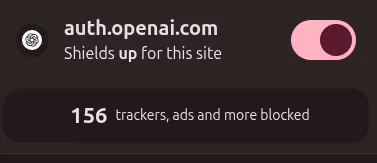
In addition to blocking ads, you can also block individual elements of a website. Say for instance that I don't like YouTube Shorts and I no longer want to see them (this is true in my case), you can opt to block Shorts from appearing on YouTube whilst still retaining every other aspect of the site. This will carry over into future sessions until you manually reset the elements.
And for local privacy, Brave also offers the ability to wipe your search history and cache upon closing the browser.
There are other, more advanced privacy options to play around with, but what I have mentioned above covers the most relevant talking points.
There are drawbacks to Brave, and it would be remiss of me not to mention them.
Baked into the browser is Brave's own cryptocurrency wallet and AI assistant. I don't have cryptocurrency and the built in AI assistant is lacklustre (and unwanted). I also prefer my browser to look clean and minimal, and I don't like the intrusion of the added buttons and settings. Both of these features can be switched off if it bothers you that much.
Also, a small handful of websites do not like Brave. As in they will not work as expected. I use Brave every day as my default browser, and I estimate that I encounter a problematic website perhaps 2-3 times a month. I don't think this is a big deal bearing in mind the trade offs, but something to be aware of if you visit the minority of these websites regularly.
Now let's return to the reason you clicked on this post in the first place. Brave blocks ads on Youtube videos by default. No changes have to be made by you. Try it out! Install Brave and select any YouTube video.
If you found this article useful, I would recommend reading my other articles which explain why we should be preventing ad tracking by default.
Sources
https://brave.com/↩